
Committing working-tree changes as directory batches
Batch mode groups every working-tree change by its top-level directory — mechanically, not by asking a model to plan the split — then generates one message per group and commits each group on its own. Distinct from the AI-planned commit-batches dialog, which asks a model to decide the split instead of grouping by folder.
Generating and committing directory batches creates one commit per top-level directory
Batch mode splits the working tree the mechanical way — one group per top-level directory touched, decided by the paths themselves rather than by asking a model to plan the split. Turn it on, generate a message for every group at once, and commit them all: each directory lands as its own commit, with its own AI-drafted message, without hand-picking files into separate stages first.
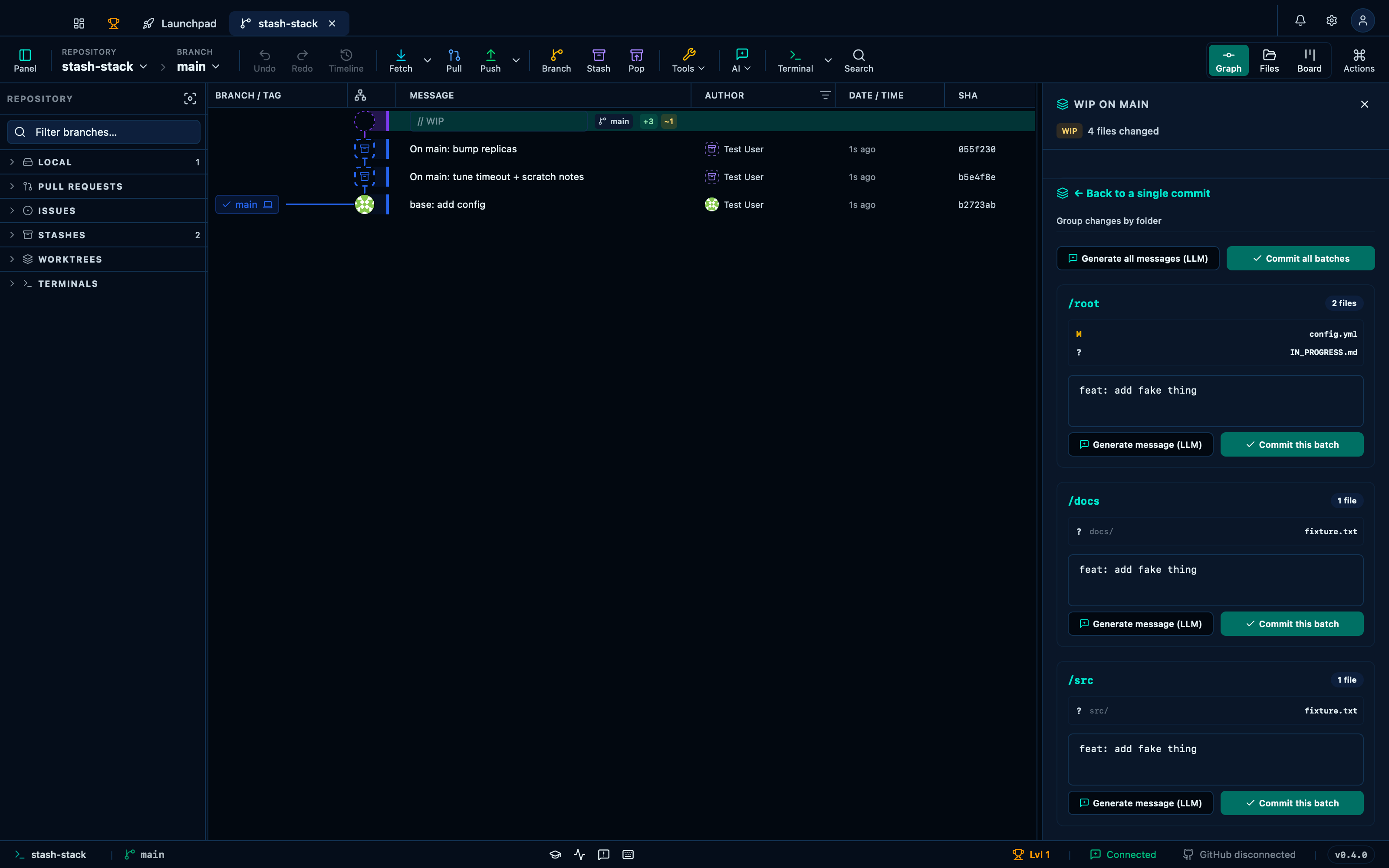
Captured from the running app by this scenario.
Do this
- Select the working-tree changes in the graph
- Toggle WIP batch mode on
- Click the generate-all-batches button
- Click the commit-all-batches button
You should see
- Every WIP batch group has a generated message
- The repository has one commit per changed top-level directory
- No error notification is displayed
This page is generated from apps/e2e/features/wip-directory-batch.feature, the end-to-end test that drives the feature it describes.