
Renaming a branch
A branch name is a label on a commit, so renaming one costs nothing: no commit is rewritten, nothing is recreated, and the work stays exactly where it was. Right-click a branch — in the graph or in the sidebar — and Rename opens a dialog with the current name already in it.
What moves is your local branch. A branch you have already pushed keeps its old name on the remote until you push the new one and delete the old one there; renaming here never reaches out to a server.
Renaming a branch updates it on disk
The dialog arrives pre-filled with the current name; type the new one and confirm, and the branch has moved by the time it closes — its commits, and the remote it tracks, follow it. The one branch that refuses is a protected one (main, by default): the dialog tells you so inline instead of letting the rename land.
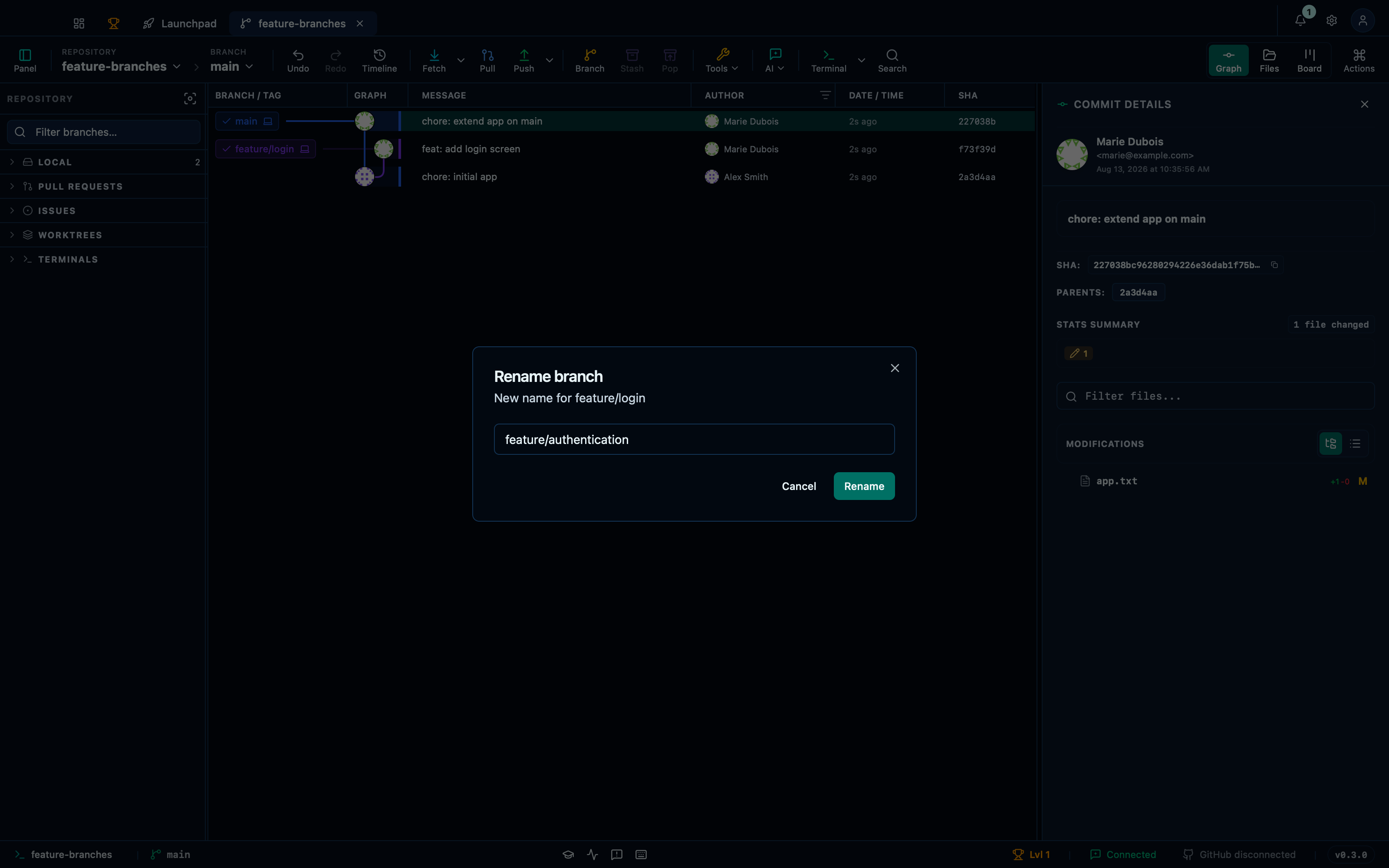
Captured from the running app by this scenario.
Do this
- Select the
HEADcommit in the graph - Open the rename dialog for the branch
feature/login - Set the rename branch name to
feature/authentication - Confirm the branch rename
You should see
- The rename branch dialog is shown
- The branch
feature/authenticationexists - The branch
feature/loginno longer exists - No error notification is displayed
This page is generated from apps/e2e/features/branch-rename.feature, the end-to-end test that drives the feature it describes.