
Reordering and combining commits by dragging them in the graph
Dropping a commit onto another folds the two together — the same combine a squash/fixup in the interactive rebase editor produces — and dropping it between two others just moves it there. Either way nothing is rewritten until a confirmation dialog previews the result: what moves, where it lands, and, for a combine, whether the folded commit keeps its own message.
Dragging a commit onto its parent combines them
Dragging the newest commit onto the one right before it previews a fold: the dialog lists the resulting history with the combined commit marked, and a mode picker decides whether the dragged commit's own message survives alongside the target's, or is folded in silently.
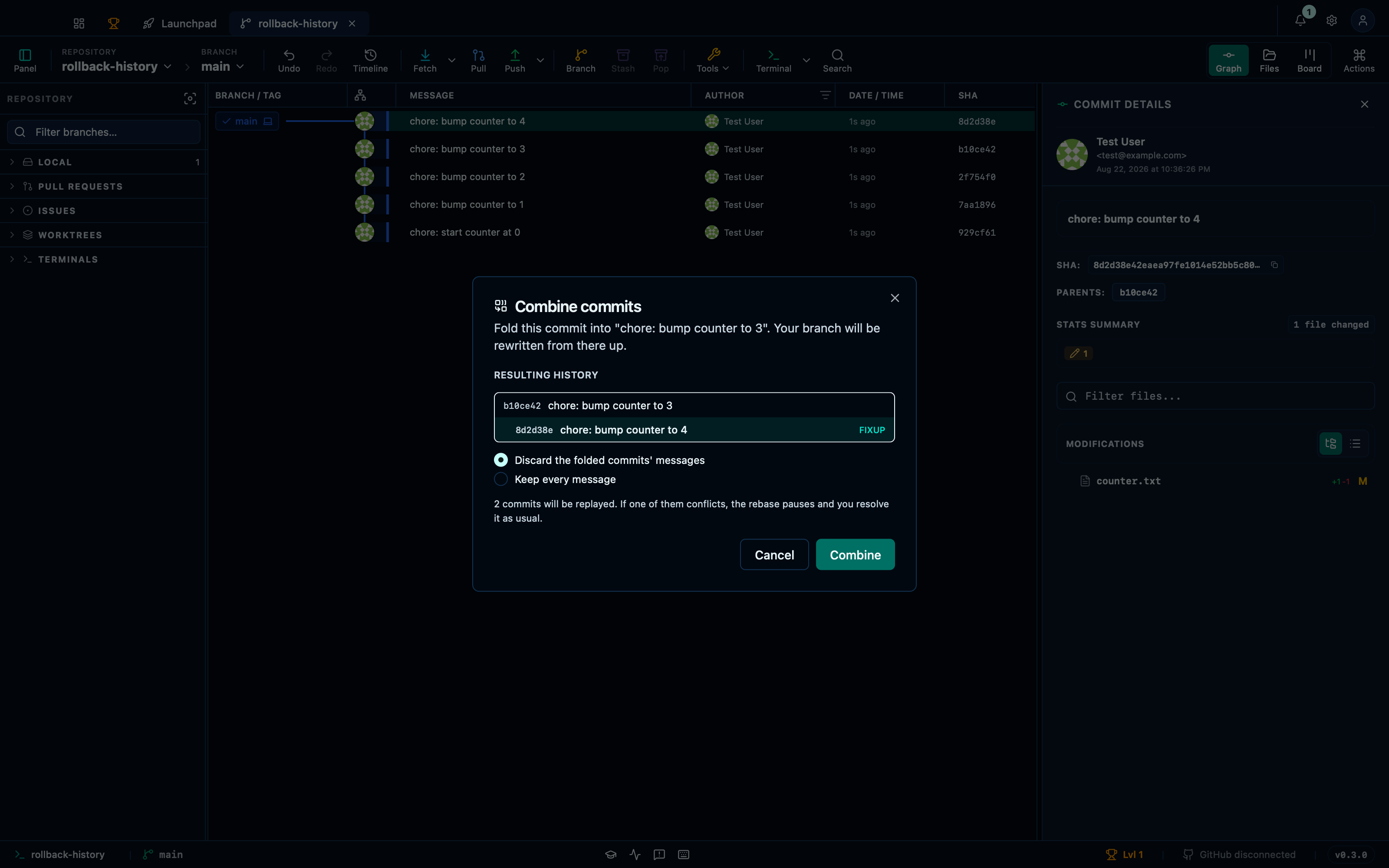
Captured from the running app by this scenario.
Do this
- Drag the commit
chore: bump counter to 4onto the commitchore: bump counter to 3 - Confirm the commit reorder
You should see
- The commit reorder dialog is shown
- The commit reorder preview marks
chore: bump counter to 4as moved - The repository HEAD commit subject contains
chore: bump counter to 3 - The repository log holds 4 commits
- The working file
counter.txtholds the linecounter=4
This page is generated from apps/e2e/features/commit-reorder.feature, the end-to-end test that drives the feature it describes.